
TL;DR
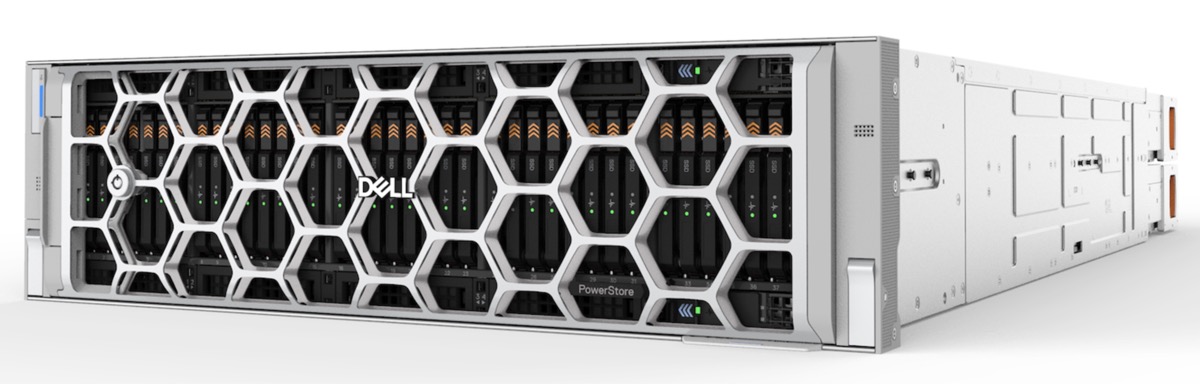
Elite is the Gen 3 family, not a single flagship. 5500 is the one most shortlists should start with. 9500 when the job is cores, memory and the same 40-bay chassis. 1500 when 24 bays and 100 GbE between nodes are enough until a later controller swap.
What this briefing covers
- A StorComp reading of PowerStore Elite: the 1500, 5500 and 9500, and PowerStoreOS 5.0
- Past the launch name: chassis, media, cache, the code these arrays ship with, and where each model is a real step from Gen 2
- All three are unified out of the box. The old T versus Q model split is gone
- Hardware notes follow StorageReview’s May 2026 lab visit in Hopkinton. Software notes follow their September 2026 OS 5.0 review. Both pieces are sponsored by Dell. Treat the numbers as vendor-guided, then check them on your workload
Three models, one chassis
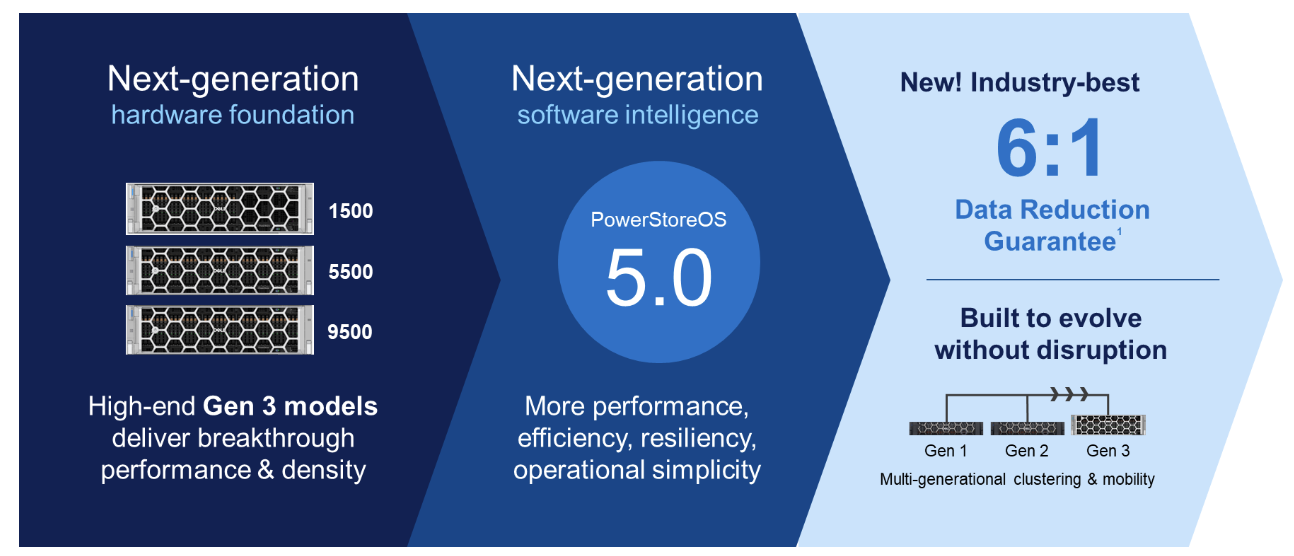
PowerStore Elite is Generation 3. The 1500, 5500 and 9500 share a 3U dual-node chassis, OCP 3.0 I/O, DDR5, PCIe Gen 5, and one PowerStoreOS 5.0 image. They differ in sockets, cores, memory, populated bays, and the link between the two nodes.
The 1500 is single-socket: 2 × 24-core CPUs per appliance at 1.9 GHz, 512 GB, up to 24 E3.S drives at launch, and 100 GbE RDMA between nodes. Dell’s path to 40 drives and 200 GbE on that model is a later controller swap, data in place. The 5500 and 9500 are dual-socket on the full 40-bay chassis with 200 GbE RDMA. The 5500 is 4 × 24-core at 1.8 GHz and 1 TB of memory. The 9500 is 4 × 32-core at 2.2 GHz and 2 TB.
| 1500 | 5500 | 9500 | |
|---|---|---|---|
| Role | Midrange | Mid / high-end | Flagship |
| CPU | 2 × 24-core, 1.9 GHz | 4 × 24-core, 1.8 GHz | 4 × 32-core, 2.2 GHz |
| Memory | 512 GB | 1 TB | 2 TB |
| Drive bays | 24 E3.S now | 40 E3.S | 40 E3.S |
| Node link | 100 GbE RDMA | 200 GbE RDMA | 200 GbE RDMA |
| OCP slots / node | 3, plus 1 reserved | 5, plus 1 reserved | 5, plus 1 reserved |
PowerStore Elite at launch, from the StorageReview hardware briefing. Figures are per appliance.
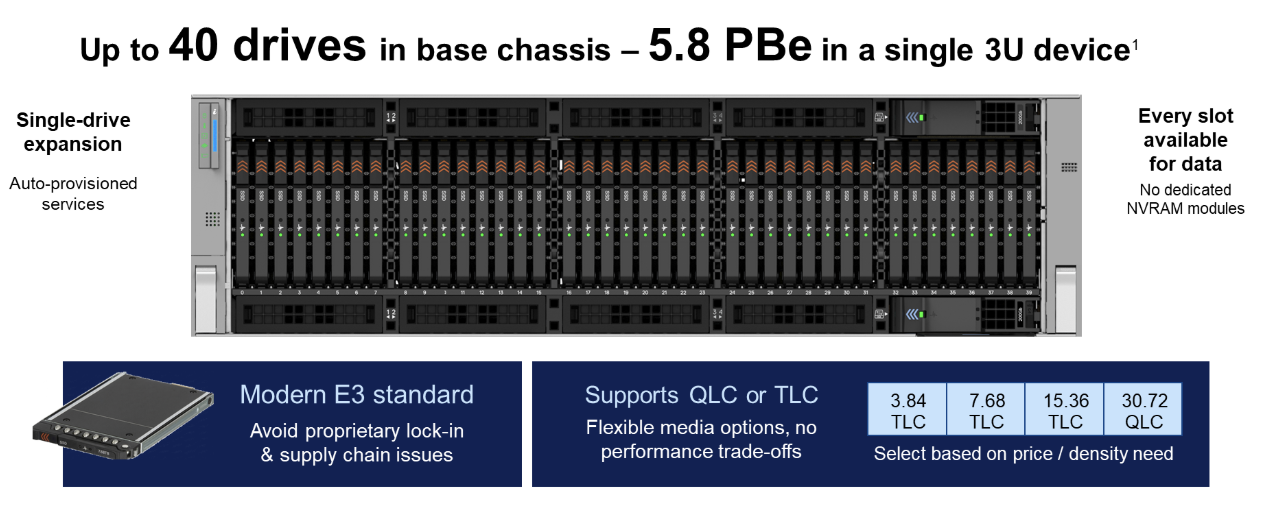
Drive options are the same set on every model: TLC at 3.84, 7.68 and 15.36 TB, and QLC at 30.72 TB. Dell’s claim, repeated by StorageReview, is no performance penalty for choosing QLC. Minimum QLC packs are 7 × 30.72 TB on the 1500 and 11 × 30.72 TB on the 5500 and 9500. TLC starts at 6 × 3.84 TB. A full 40-bay QLC chassis is about 1.2 PB raw. At Dell’s 6:1 reduction that is the 5.8 PB effective figure used in the launch. That effective number assumes reducible data and the guarantee, which is narrower than the headline.
What actually moved from Gen 2
Gen 2 was a 2U appliance, PCIe Gen 3, DDR4, up to 25 dual-ported 2.5-inch U.2 drives, and a 2 × 10 GbE RDMA link between nodes. Four front bays were NVRAM cache. Elite moves the cache off those bays.
| PowerStore Gen 2 | PowerStore Elite | |
|---|---|---|
| Chassis | 2U, two nodes | 3U, two nodes |
| I/O bus | PCIe Gen 3 | PCIe Gen 5 |
| Memory | DDR4 | DDR5 |
| Drives | Up to 25 × 2.5-inch U.2 | Up to 40 × E3.S |
| Expansion | Up to 24 × U.2 | Up to 44 × E3.S, after RTS |
| Write cache | U.2 NVRAM drives | Software-defined persistent memory |
| I/O cards | 3 × SLIC / OCP 2.0 | Up to 5 × OCP 3.0 |
| Between nodes | 2 × 10 GbE RDMA | Up to 200 GbE RDMA |
The subsystems that changed. Elite column is the 5500 / 9500 chassis.
Forty data bays in 3U is about 13 drives per rack unit, against about 10.5 on Gen 2. The drives are standard E3.S 1T NVMe SSDs, dual-ported, without a Dell carrier. Each controller uses two PCIe lanes per drive. The rest of the Gen 5 lanes go to the node link and the rear I/O. Cards at launch include 4 × 32/64 Gb FC, 4 × 1/10 GbE, 4 × 10/25 GbE, and 2 × 100 GbE. 200/400 GbE Ethernet and 128 Gb FC are listed as later cards. Fibre Channel encryption in flight is a card you can fit now and a feature that waits for PowerStoreOS 5.1.
Service parts move onto the PowerEdge shelf: iDRAC instead of the old EMC GEM controller, and PowerEdge power supplies and battery units. Both controllers face the same way and slide out as 1.5U trays. That is a real change for anyone who has pulled the inverted top controller on Gen 2.
Cache no longer spends a drive bay
Software-defined persistent memory presents DDR5 to the OS as an ACPI NVDIMM. On power loss a BIOS handler writes that state to the M.2 boot drive, held up by the batteries. The 5500 and 9500 carry two 54 Wh packs per controller, 216 Wh in the chassis. The 1500 carries one pack per controller, 108 Wh. The front bays are then all for data.
Writes are mirrored between nodes on the RDMA link and acknowledged before they touch the drives. Destage builds full-stripe writes. That is the path Dell is using to keep write amplification down on 30 TB QLC. The node link itself is on the midplane, not a cable, and it is not tied to a CPU generation. That is the mechanical half of the ten-year Lifecycle Extension story: a later controller can land without redesigning the fabric or moving the drives.
PowerStoreOS 5.0
OS 5.0 is generally available on new Gen 3 shipments and as a download for Gen 1 and Gen 2. Some features still need the new hardware. Encrypted Fibre Channel is the obvious one. The operating system is the migration path: add a Gen 3 appliance to the cluster, move volumes in PowerStore Manager, and empty the older box.
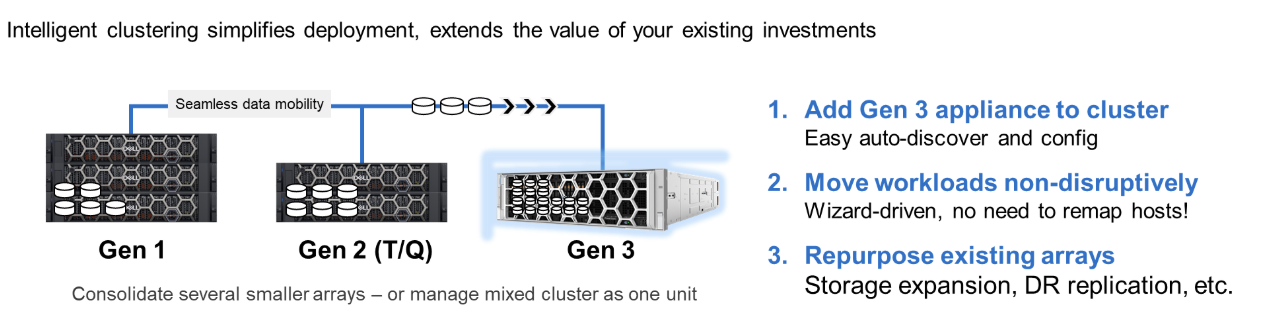
- Gen 1, Gen 2 and Gen 3 can sit in one cluster. Gen 3 can join a Gen 2 cluster. After that, another Gen 2 cannot be added. The initial wizard says so.
- Block migration between appliances is in 5.0, with cutover when the copy finishes. File migration between appliances is the next release. Until then Dell points file customers at replication, a Unity or VNX import, or a host move such as Storage vMotion.
- On Gen 3 every appliance is unified. Dynamic core allocation gives file the CPU and memory it is using and returns the rest to block. Gen 1 and Gen 2 still ask unified or block-optimized at deployment, and unified still reserves a NAS slice whether file is used or not.
- Metro between a Gen 3 and a Gen 2 preferred-role flip is a single click, under a second in the review Dell walked StorageReview through.
- The on-disk page size moves from 4K to 8K. Unaligned dedupe is there so an 8K match can still hit when it straddles a page. Compression offload sits on newer QAT silicon.
The data-reduction guarantee moves from 5:1 to 6:1. It applies to Gen 3 arrays first installed on OS 5.0, and only to reducible data. If a qualifying customer misses 6:1 on that data, Dell’s stated remedy is more drives. Snapshot and thin-provisioning savings are a different number. StorageReview was shown dashboards at 7.2:1 and 7.4:1 overall on a lightly loaded Dell data set, with reducible ratios above 11:1, and overall efficiency near 30:1 once snapshots and thin were rolled in. Those captures demonstrate the report. They are not a production result.
Elsewhere in 5.0: Nutanix volumes get their own tab instead of burying the array’s volume list; XCOPY offload works with Red Hat’s Migration Toolkit for Virtualization; performance widgets split utilization into CPU, cache, front-end ports and back-end drives, with a forecast after about two weeks; anomaly detection from 4.2 is promoted to the dashboard. Clone limits rise from 256 to 1,000 per volume family on Gen 3 and on Gen 2 above the 500. NVMe host mappings double to 32,000 on the 9xxx. Multiparty authorization is now a catalog of 61 actions, 41 on by default, with a timeout of three to seven days. Dell Cyber Detect is Index Engines CyberSense beside the array, scanning snapshots. It is not inline detection in the data path. Inline ransomware detection is still described as groundwork in the I/O telemetry. Data-at-rest key rotation is now something an admin can start. Scheduled rotation is later. Gen 3 firmware signing uses post-quantum cryptography, and the persistent-memory path is described as FIPS 140-3.
OS 5.1, expected in the fall of 2026, is where encrypted data-in-flight on Fibre Channel is supposed to turn on. The cards can be in the chassis already. Encryption at the host would destroy reduction. EDIF is meant to encrypt the SAN hop and still let the array see reducible data.
What the published tests actually say
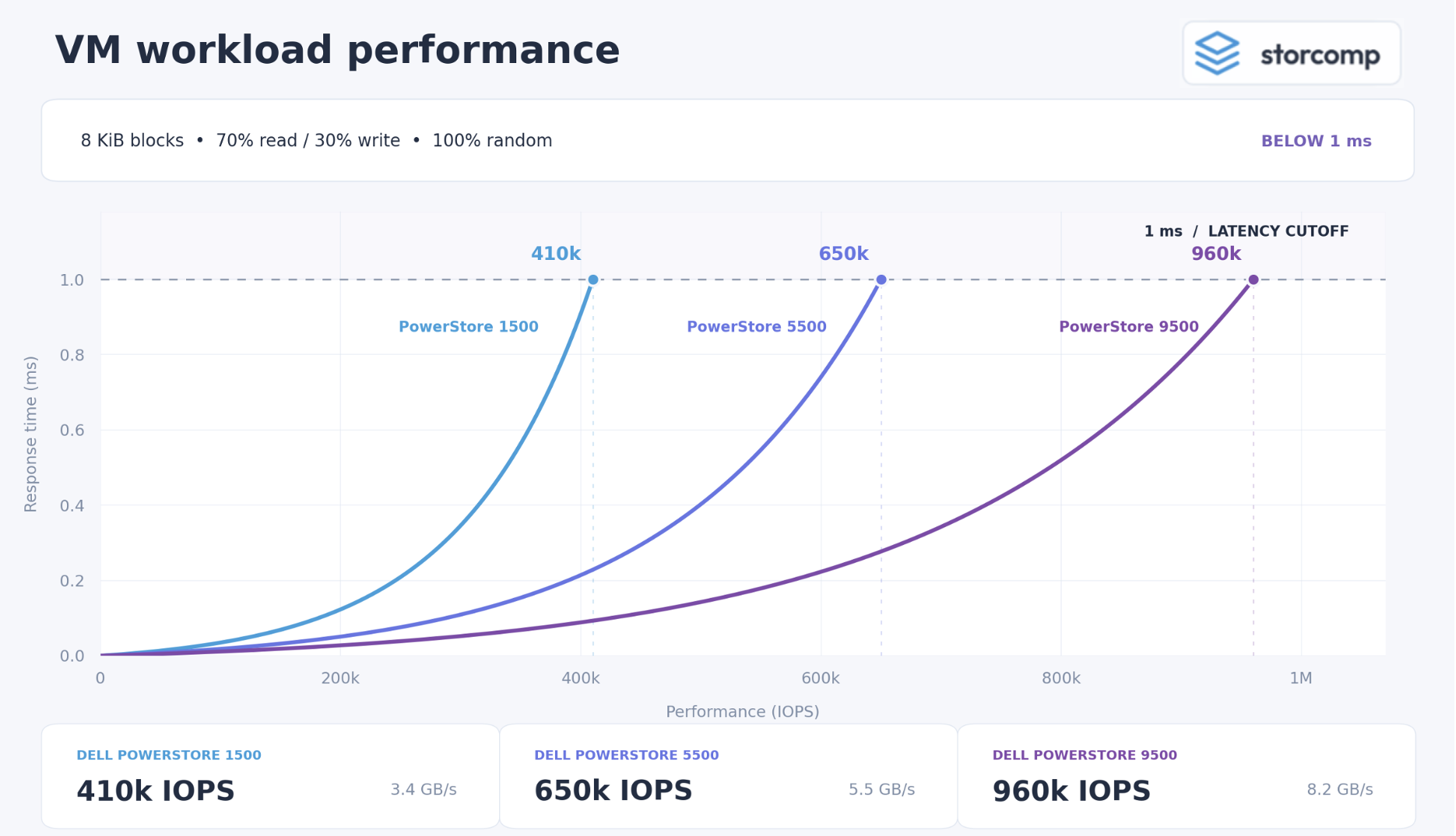
On a VM workload — 8 KiB, 70% read / 30% write, 100% random, response time held under 1 ms — the three models separate by controller, not by the bezel. The 1500 reaches 410,000 IOPS and 3.4 GB/s. The 5500 reaches 650,000 IOPS and 5.5 GB/s. The 9500 reaches 960,000 IOPS and 8.2 GB/s. That is the curve in the chart: each model is plotted up to the 1 ms line, not to a saturated maximum.
| Model | IOPS | Bandwidth |
|---|---|---|
| PowerStore 1500 | 410,000 | 3.4 GB/s |
| PowerStore 5500 | 650,000 | 5.5 GB/s |
| PowerStore 9500 | 960,000 | 8.2 GB/s |
Same VM workload, held under 1 ms. Bandwidth is the throughput at that point.
Dell’s own comparison with Gen 2, as relayed by StorageReview, is up to 3× IOPS on 8K mixed, and up to 3× throughput on 1 MB sequential read and write. Treat “up to” as a ceiling, not a sizing input.
Principled Technologies, cited in that same StorageReview piece, ran a 9500 against an unnamed all-NVMe competitor with Vdbench. On an OLTP-with-analytics profile the 9500 delivered 834,558 IOPS against 357,427. At a 310,000 IOPS target on a mixed small-block database workload, latency was 0.44 ms against 1.22 ms. On a data set built for 2:1 compression and 2.5:1 dedupe at an 8 KB unit, reduction was 6.6:1 against 2.76:1. The competitor is unnamed. The test is not a StorComp lab run. Use it as a reason to ask for the workbook, not as a ranking.
What is actually better
- One chassis family for TLC and QLC. Buying a “Q” model to get dense media is over.
- Cache no longer consumes front bays, and the node link is finally in the same decade as the drives.
- Gen 3 joins an existing cluster. Block cutover stays inside PowerStore Manager. Unity import is still the practical path for the large Unity install base Dell cites.
- File and block share cores on Gen 3 instead of a reserved NAS slice that block workloads pay for whether file is used.
- OCP 3.0, iDRAC and PowerEdge power parts pull PowerStore into the same service chain as the servers next to it.
- The 6:1 guarantee has a remedy Dell will state out loud: more drives, on reducible data, for arrays that started life on OS 5.0.
What to treat carefully
- The two long StorageReview pieces are sponsored by Dell. The lab access was real. The competitor in the Principled Technologies test is not named.
- 6:1 is not 5:1 with a new sticker, and it is not the 30:1 efficiency figure that includes snapshots and thin provisioning.
- The 1500 does not ship with 40 bays. The extra 16, and 200 GbE, are a later upgrade.
- The 44-drive expansion shelf is post-RTS. Do not put it in a rack drawing until the orderable date is real.
- File migration inside the cluster is not in 5.0. A file-heavy move off Gen 2 still needs another tool.
- Clustering is one-way once Gen 3 is in. Plan the order of appliances before the wizard.
- Inline ransomware detection is not shipping. Cyber Detect scans snapshots from outside the data path. EDIF waits for 5.1.
- Dell AIOps recommendations that reclaim capacity or drive code updates were in limited availability when StorageReview wrote the September piece. ProSupport or higher is the license path they describe.
Power and cooling
Dell’s Gen 3 spec sheet publishes power for a full base enclosure: every drive bay filled and the I/O modules fitted. At a typical 26°C that is 915 W on the 1500, 1,621 W on the 5500 and 1,977 W on the 9500. The 40°C maximum is only a little higher. Heat follows the same split. These are the numbers to start a PDU and a cooling budget from. A smaller drive pack draws less. The supply nameplate does not: the 1500 uses 1,100 W supplies, and the 5500 and 9500 use 2,800 W supplies, four of them in a 2+2 layout. That rating is headroom, not the draw.
| Model | Full chassis in the spec | Typical | Maximum |
|---|---|---|---|
| 1500 | 24 × E3.S, 6 OCP | 915 W · 3,123 BTU/h | 926 W · 3,160 BTU/h |
| 5500 | 40 × E3.S, 10 OCP | 1,621 W · 5,531 BTU/h | 1,729 W · 5,898 BTU/h |
| 9500 | 40 × E3.S, 10 OCP | 1,977 W · 6,745 BTU/h | 2,108 W · 7,193 BTU/h |
Dell PowerStore Gen 3 spec sheet. Full base enclosure, 200–240 V. Typical is 26°C. Maximum is 40°C.
Dell also says E3.S airflow cuts the cooling requirement by about half versus an equivalent 2.5-inch deployment. That is a claim about the drive form factor, not a claim that a full 9500 draws half of a full Gen 2. Per-CPU TDP on these Intel parts runs from 165 W to 270 W, and each controller has six fans, twelve in the chassis. Do not put a sizer line that prints the same 95 W for a 1500 and a 9500 into a power budget. Ask Dell for the worksheet on the drive count you would buy.
List price at about 300 TB raw
At about 300 TB raw, the average of quotes StorComp collected is 4,800 USD per raw terabyte on the 1500, 5,400 on the 5500 and 5,900 on the 9500. Same capacity class, so the gap is the controller, not a different pile of drives. This is not a Dell offer. Support, the media mix and a deal-registration discount move the number you actually pay. How far these averages can be used is in the appendix.
| Model | Raw capacity | USD / raw TB |
|---|---|---|
| PowerStore 1500 | ~300 TB | 4,800 |
| PowerStore 5500 | ~300 TB | 5,400 |
| PowerStore 9500 | ~300 TB | 5,900 |
Average of collected quotes, per raw terabyte, at about 300 TB raw. Not an offer.
Where this leaves a shortlist
Start at the 5500 when the requirement is a mixed block and file estate that should still be in service when the controllers are swapped. Take the 9500 when 2 TB of memory and the higher core count are the point, not the bezel. Take the 1500 when the workload fits 24 bays and you have a written plan for the later bay unlock. Do not write a 6:1 business case against data the array will classify as unreducible.
Put the three next to arrays that already encrypt the SAN hop, and next to platforms whose file move does not wait for the following code release. Then compare the configuration, not the Elite name. At about 300 TB raw the step in those collected quotes, from the 1500 to the 9500, is 1,100 USD per raw terabyte. The VM chart under 1 ms is the performance step that money is buying. The power table is what the rack has to feed.
Appendix — how to read the prices
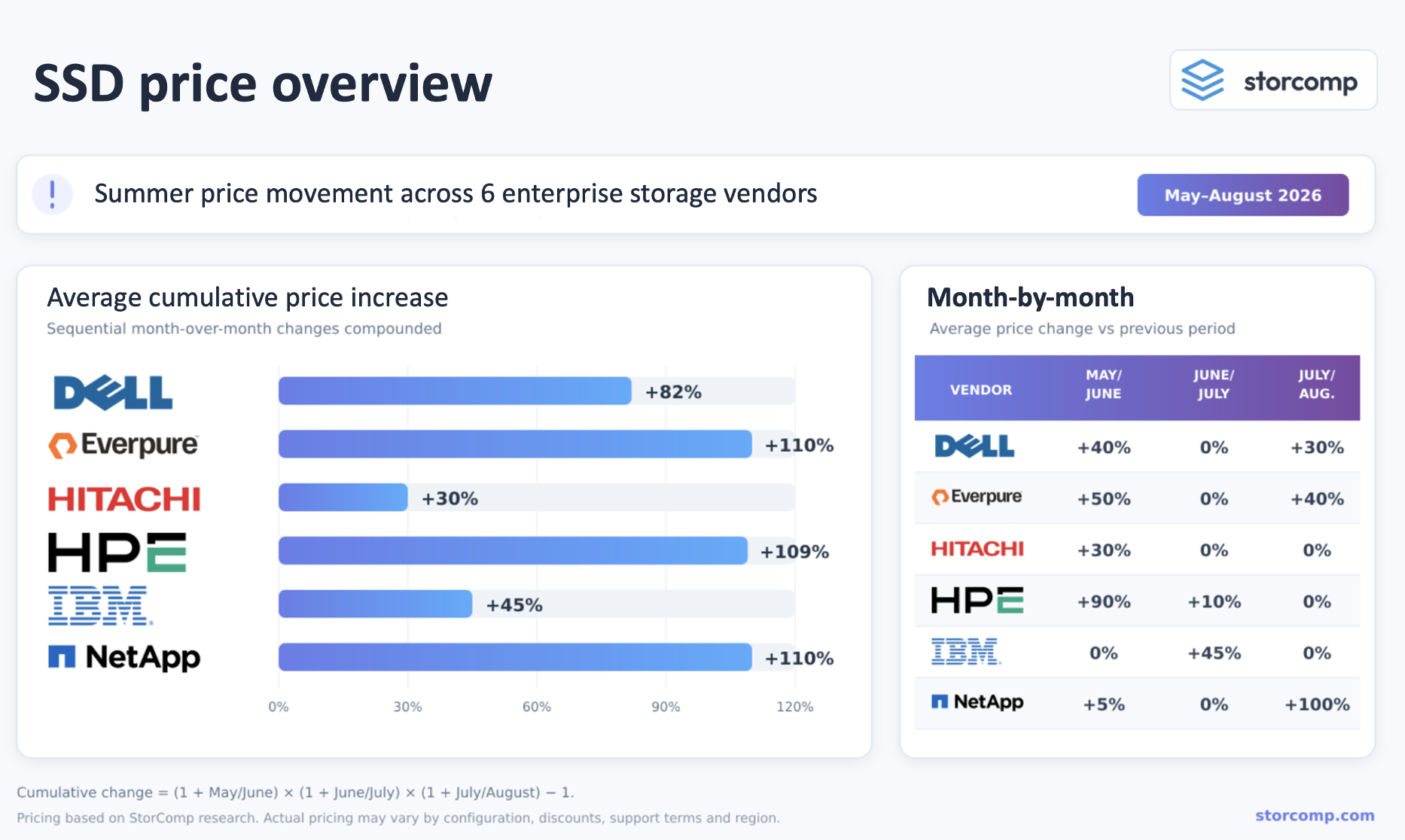
Every USD-per-terabyte figure in this briefing, and the SSD price chart, is an average of quotes StorComp collected. It is a picture of the market at the time those quotes were written. It is not a Dell offer, not a formal quotation, and not a number a reseller is obliged to honour.
Configuration, drive mix, support term, region, discount and the week of the quote all move the price. Use the average to see the shape of a shortlist. Put a purchase order against a quote written for the configuration you would actually buy.
Sources
StorageReview’s two Elite pieces are the backbone of the hardware and software sections. Both say they are sponsored by Dell Technologies. The podcast is the same lab visit, on camera.
- StorageReview — Dell PowerStore Gen 3: Inside the Most Aggressive Enterprise Storage Reset in Years — Brian Beeler, 19 May 2026. Hardware deep dive. Sponsored.
- StorageReview — Dell PowerStoreOS 5.0 Deep Dive: The Software Half of the Elite Reset — Brian Beeler, 30 September 2026. Sponsored.
- StorageReview podcast 149 — Dell PowerStore Elite, hands-on from the Hopkinton lab — Same visit, with the 9500 and 1500 controllers opened.
- StorageReview — Dell expands PowerStore, PowerEdge, PowerProtect, and the automation portfolio — Launch timing: Elite listed for July 2026, with the 3× and 5.8 PB claims.
- Dell — PowerStore Gen 3 spec sheet — Source of the power and heat figures. Full base enclosure.
- Dell Info Hub — PowerStore Gen 3 power supplies — 1,100 W supplies on the 1500. 2,800 W supplies on the 5500 and 9500. Four supplies, 2+2.
- Dell — PowerStore product page — Vendor page. Specs on the quote still win over the marketing line.
Based on StorComp research from public and market-observed sources. Actual results and pricing may vary by configuration, workload, region, discounts and support terms.